
Buy a Turkish SIM card at the airport (Turkcell, Vodafone, or Türk Telekom). You'll need your passport. Tourist SIMs offer 20–30 GB for ~€15–20. Activate immediately — registration expires 48 hours after purchase if not done.
The local currency is Turkish Lira (TRY). Exchange offices in Alanya center offer much better rates than hotels or airports. ATMs are everywhere but charge fees — withdraw large amounts less often. Major cards accepted in most restaurants and shops.
Always use the taximeter — ask the driver to turn it on ('taksi metre'). Short city rides cost 50–100 TL. BiTaksi or Uber apps work in Alanya for price transparency. Bargain for longer trips (Dim Cave, Sapadere Canyon).
Cleopatra Beach (Kleopatra Plajı) is the most famous — clean sand, warm water, lined with sunbeds and cafes. Keykubat Beach is quieter and more local. Damlataş Beach is closest to the castle. All public beaches are free — sunbed rentals around 150–200 TL/day.
Beach season runs May–October. Peak summer (July–August) averages around 32 °C and is crowded. September–October offers warm sea (27–29 °C), fewer tourists, and lower prices — the sweet spot. April–May is great for sightseeing without the heat.
Pack light clothing, a hat and sunscreen for summer — July and August are hot even in the shade. In April, May, October and November you will want a light jacket for the evenings. Boat tours and beach clubs generally run from May to October. On a hot day, Dim Cave stays at about 18 °C year-round — the best free air conditioning in Alanya.
Sea temperatures range from about 18 °C in March to 30 °C in August. October is the value month — prices drop while the water is still around 27 °C. See the month-by-month Alanya climate table for full averages.
Nearest airport: Gazipaşa–Alanya Airport (GZP), ~45 min. Alternatively, Antalya Airport (AYT) is 2.5h by bus or 1.5h by private transfer. HAVAS buses and shared shuttles run from both airports. Private transfer from AYT costs ~€60–80.
Pide (Turkish flatbread with toppings) is the best budget meal — around 80–120 TL. Künefe (warm cheese pastry with syrup) is a must-try dessert. Avoid tourist-trap restaurants near the pier — walk one block inland for better prices and quality.
Alanya is very safe for tourists. Standard precautions apply: watch for pickpockets in crowded bazaars, don't leave valuables on the beach. Emergency: 112. Police: 155. Tap water is not drinkable — buy bottled water (5L = ~15 TL from supermarkets).
🚌 Bus to Dim Çayı
Follow these simple steps to reach Dim Çayı by bus:
Start at Alanya Bus Station (Alanya Otogarı) — view on map
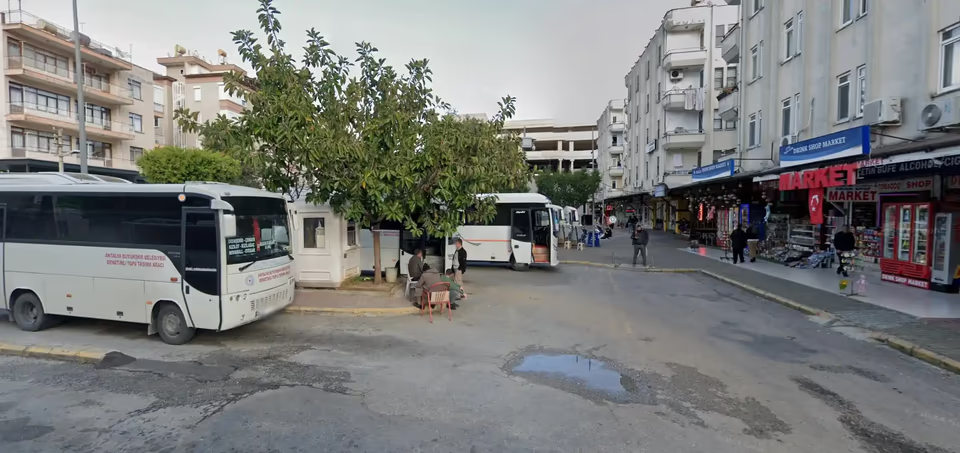
Look for Bus Number 10. This bus typically heads towards Dim Çayı — destination displayed on the front. We usually ride to the end of the route where the best spots are. Bus Number 10 operates daily from 6:30 AM to 7:20 PM.
Key Details
- 🕐 Operating Hours: Daily, 6:30 AM – 7:20 PM
- 🔄 Frequency: Every 40–120 minutes (depends on traffic and time of day)
- 🗺️ Route: Departs from Cuma Pazarı (20180), ends at Göl Piknik-Kuzyaka Son Durak, passing stops near Dim Çayı.
Pay the Fare
The fare is affordable — typically around 1 USD in Turkish Lira (prices may vary). You can pay in cash, with a bank card, or use an Alanya Kentkart if you have one.
Return Trip
For the return journey, simply catch the same bus back to Alanya. The last bus from Dim Çayı to central Alanya typically departs around 7:00–7:30 PM. Check the schedule in advance to avoid a long wait. Use Moovit or Alanya Kentkart app for real-time updates.
📶 How to Stay Online in Turkey
Buying a Local SIM Card
- From Local Markets: Simple but can be expensive — you'll get tourist pricing.
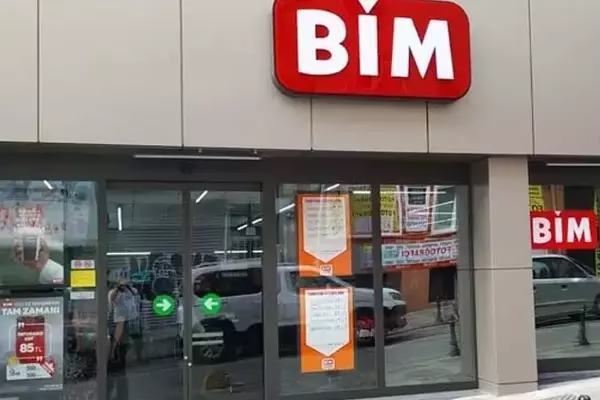
- From BIM Supermarkets: Bimcell SIM cards are the most affordable option. Bring your passport and visit 3–4 hours before closing to allow time for registration.
Using an eSIM with Airalo
For the most affordable and hassle-free solution — especially if staying connected across multiple countries — we recommend using an eSIM. Airalo for iOS and Android lets you buy and install eSIMs instantly — works in Turkey and 190+ countries. It's cheaper than a local SIM or roaming.
How to set it up:
- Install the Airalo App (App Store for iOS / Google Play for Android)
- Choose a Turkey eSIM plan
- Install before your trip — it activates automatically when you arrive
💳 ATM Guide — Lowest Fees in Alanya
Best ATMs: Turkish State Banks
Turkish state banks charge the lowest ATM fees for foreign cards. Use these first:
- Ziraat Bankası — most common, lowest fees, ATMs near Atatürk Square and the promenade
- Halkbank — no ATM fee for many European cards, branches in city centre
- Vakıfbank — reliable, widely available along İnönü Caddesi
What to Avoid
- Hotel lobby ATMs — convenience fee up to 5–7% on top of DCC
- Airport currency exchange kiosks — worst rates in Turkey
- Independent ATMs (non-bank) in tourist areas — high fixed fees
Tip: withdraw a larger amount less often to reduce per-transaction fees. Most ATMs in Alanya have a ₺5,000–10,000 per-transaction limit.